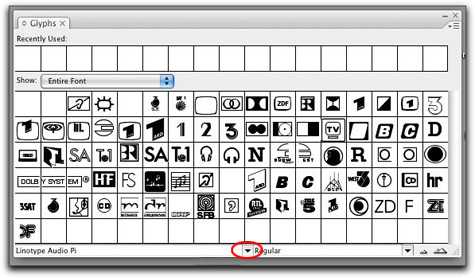
 Once you explore all of the characters in your favorite type face or font, you may want to see what else is hidden in the keyboard map for the font. For example, how many times have you wondered were the © symbol is located, or where the ® symbol for registered product names? Better yet, you may have the need to check out the full keyboard map for a glyph or symbol font like Zapf Dingbats or Carta. Glyph fonts like these are only a few of the available fonts to you in the lab. Alternative type characters or glyphs can be hard to find. Luckily inside of InDesign and Illustrator you can easily find a map of the keyboard layout. InDesign’s Glyph menu can be found by going to the top menu bar > find Window> scroll down to Type & Tables > then down to Glyphs. A window like the one above will appear. Select the font you want to see by clicking on the small arrow that is circled in red.